For engineering and infrastructure consultancies in Australia

Timesheets and tax invoices for Australian engineering consultancies.

Log hours against projects and phases, approve and lock each week, and turn billable time into tax invoices with GST worked out for you. Time records are built to the Fair Work Act’s record-keeping rules: a correction is a new entry, with a reason and a name, and the original stays.

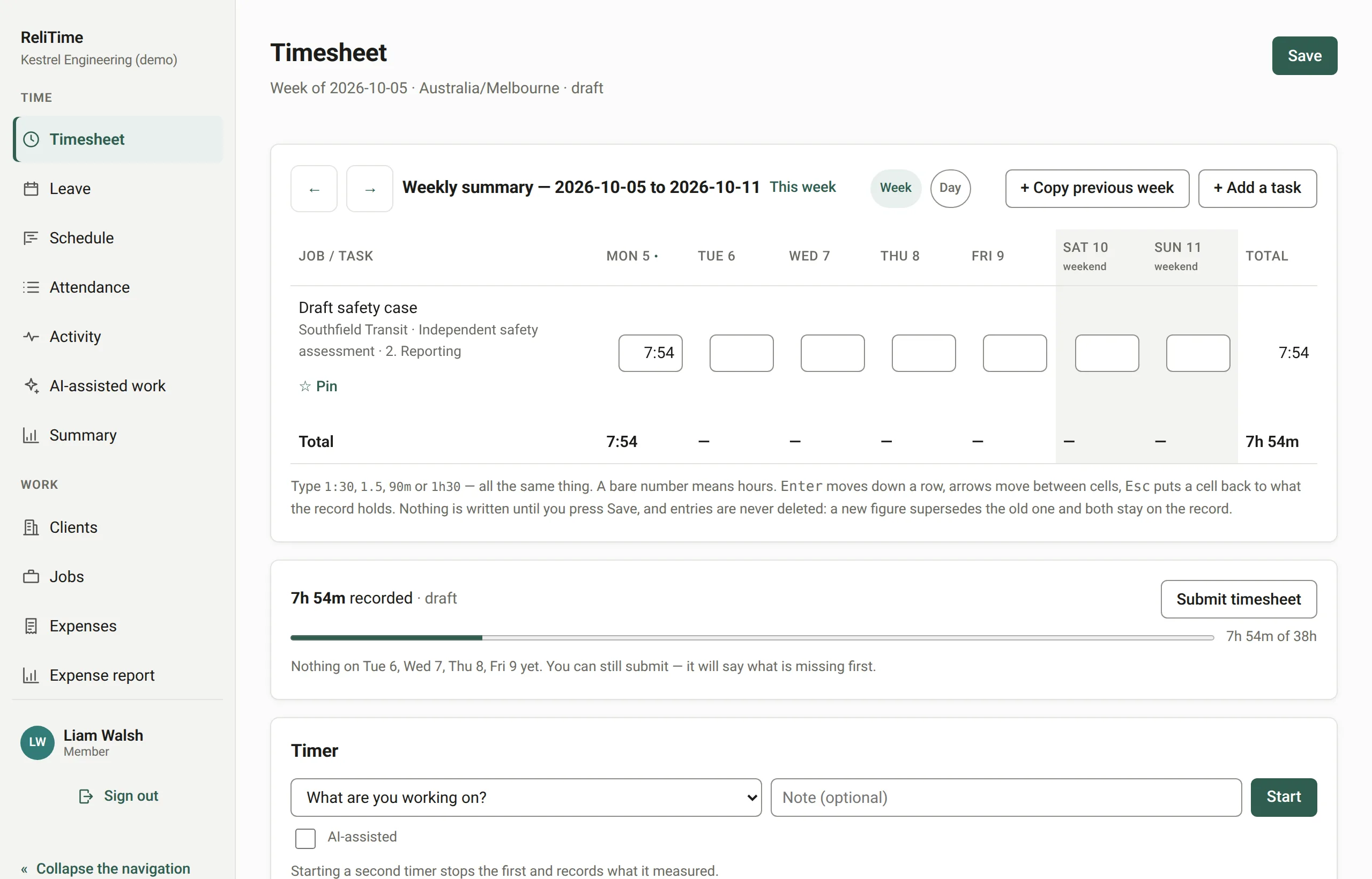
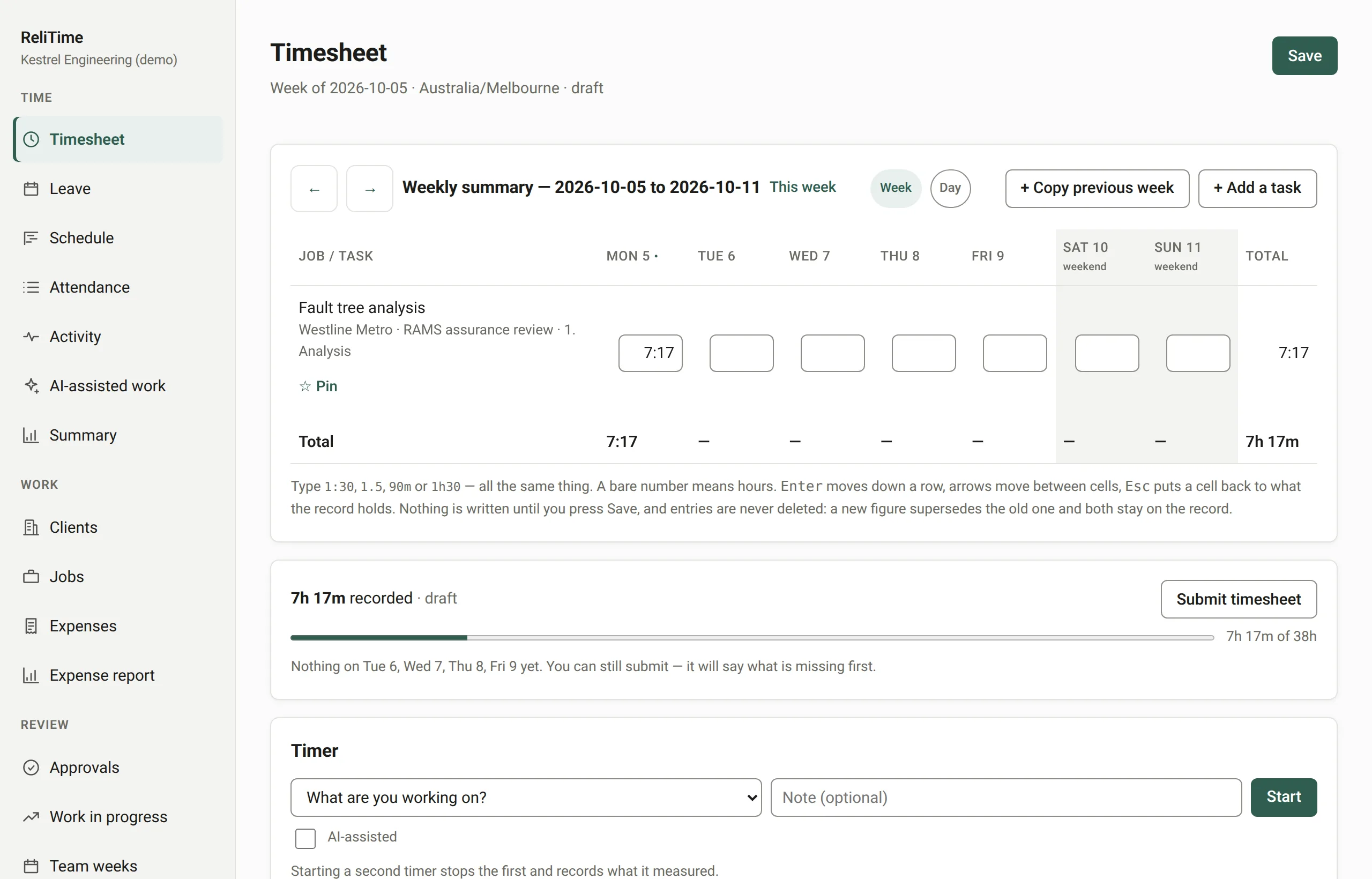
The weekly timesheet: tasks for several client jobs down the side, hours for each day of the week, and the week's total beside the button to submit it.

What the record guarantees

Why ReliTime

It was built inside an engineering consultancy, for its own timesheets, approvals and invoices, and it is used for them every week. These are the six things that came from that.

Records you can defend

Every correction supersedes the entry before it, carrying a reason and the name of whoever made it. No time entry is ever deleted. Approved weeks lock, and the database itself enforces it, so the application cannot switch it off.

How the record is kept
It does not watch anyone

No screenshots, no location tracking, no idle detection and no productivity scores. People record the hours they worked, and ReliTime keeps that record straight.

Why it refuses to

Tax invoices with GST

GST at 10% worked out for each client, GST-free for an overseas one, both ABNs on the face, a series per financial year from July, and adjustment notes for every correction.

GST invoicing in detail

Built for engineering work

Jobs, phases and tasks budgeted in hours, and each job in money as well. Rates that change on a date without rewriting history, and work in progress that keeps time that was never chargeable apart from time that was written off.

Every feature

Figures that do not bluff

An hour with no rate is named, never billed at nothing. Rounding happens on the invoice, never to the hours on the record. A figure nobody set shows as missing rather than as a plausible zero.

What that looks like

Designed for the person filling it in

A keyboard-first week, a draft that is only saved when you say so, undo rather than "are you sure?", and a phone view with buttons made for one hand.

The design decisions

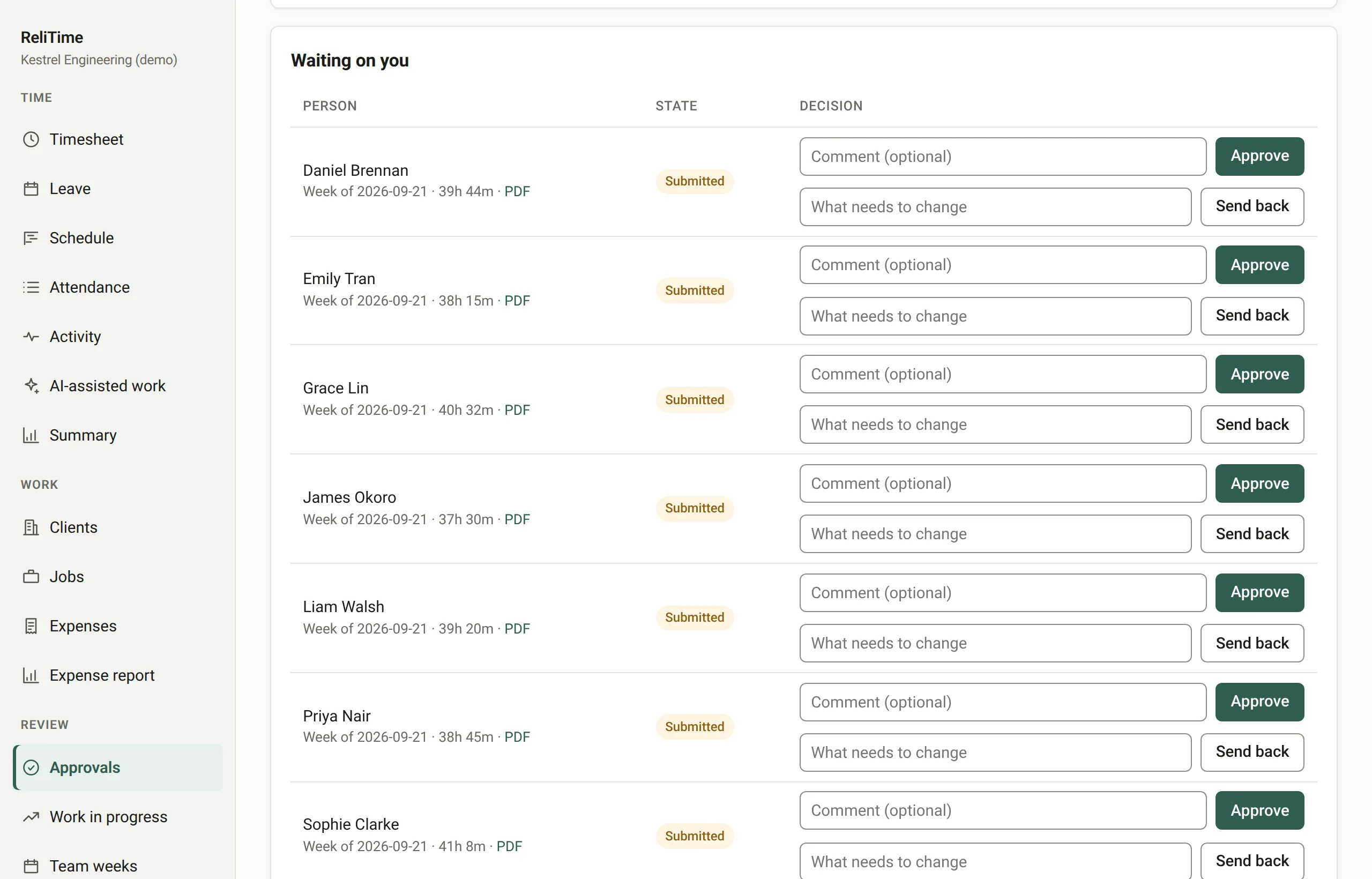
Approval that means something

A week is submitted, approved and locked. Reopening a locked week needs an authorisation countersigned by someone other than the person whose week it is, and it can be used once. Every step is in the audit log, with who did it and when.

The approvals queue: submitted weeks listed by person, each with its hours, waiting for a decision.

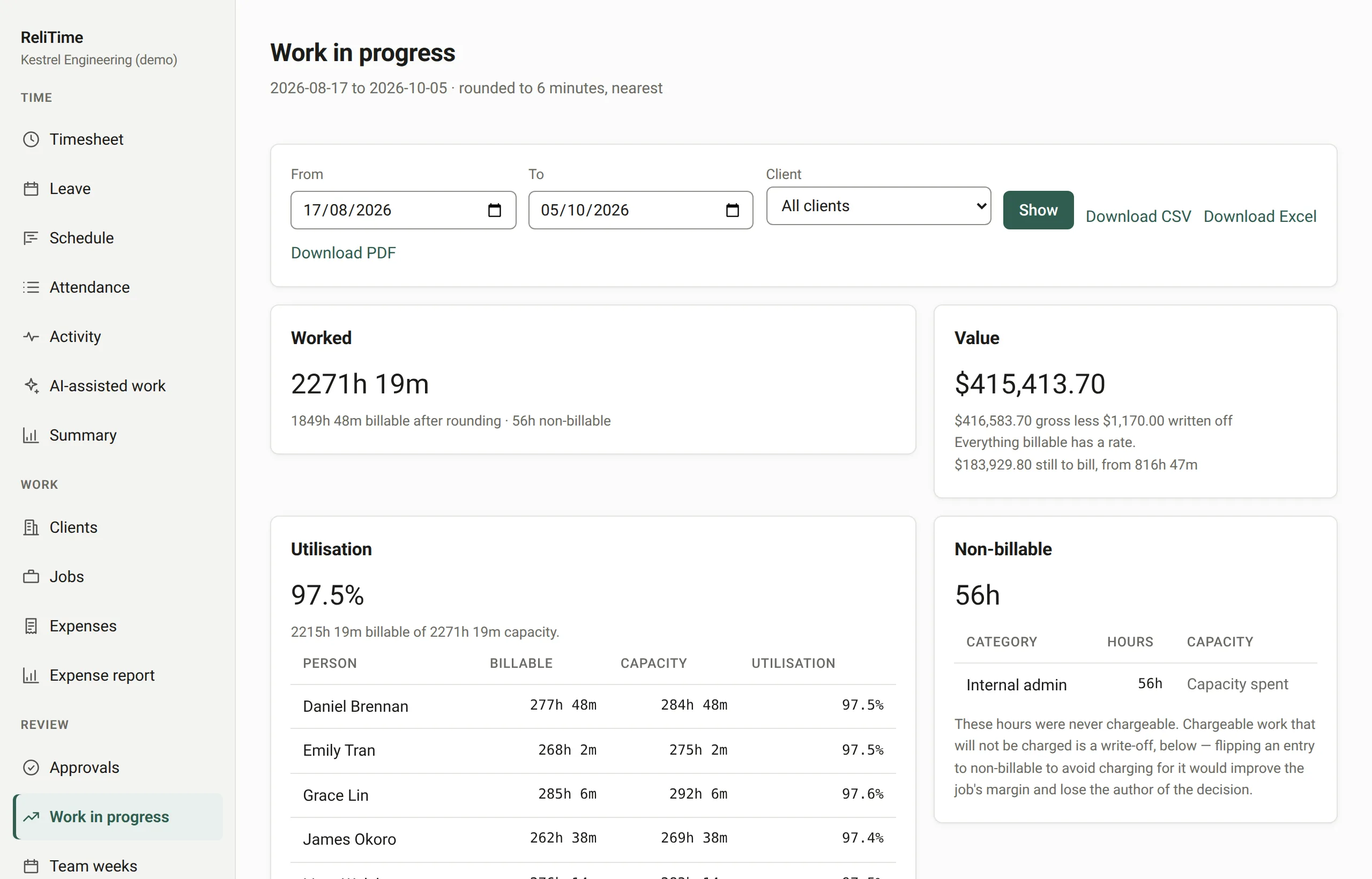
Know what each job is worth

Work in progress prices every hour at the rate in force on the day it was worked. It shows what is billable, what has already been billed, and what was never chargeable, with the reason for each.

The work in progress report: each client job with the hours worked, the billable value, and how much is still to bill.

Tax invoices drawn from approved time

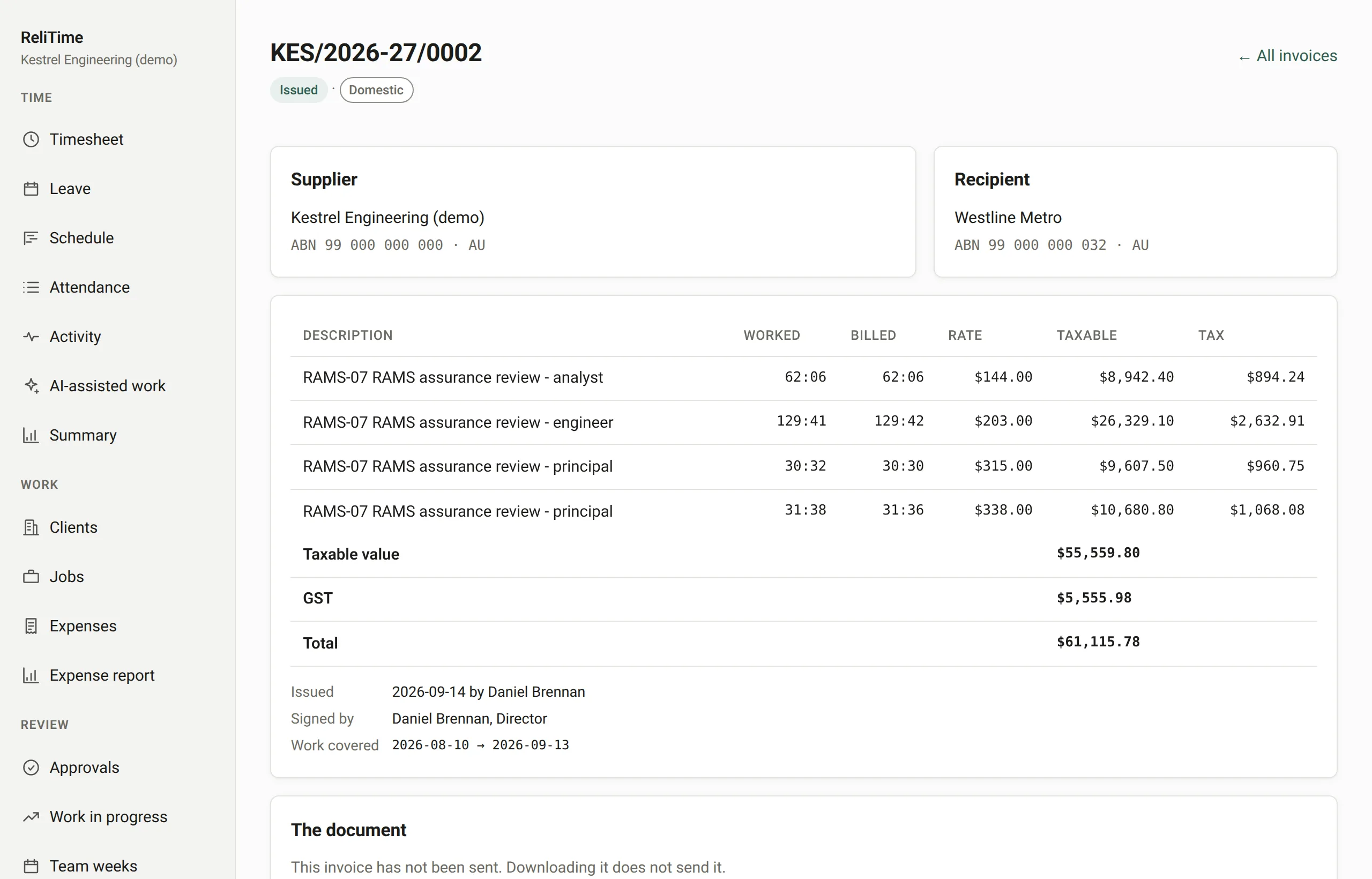
Invoices are drawn from approved, locked time and titled as tax invoices, with your ABN and your client's and the GST worked out below. Each is issued under the next number in the series and corrected only by adjustment notes.

A tax invoice on screen, with the supplier and recipient ABNs, the taxable value of each line, and the GST worked out below.

Leave, holidays and who is away

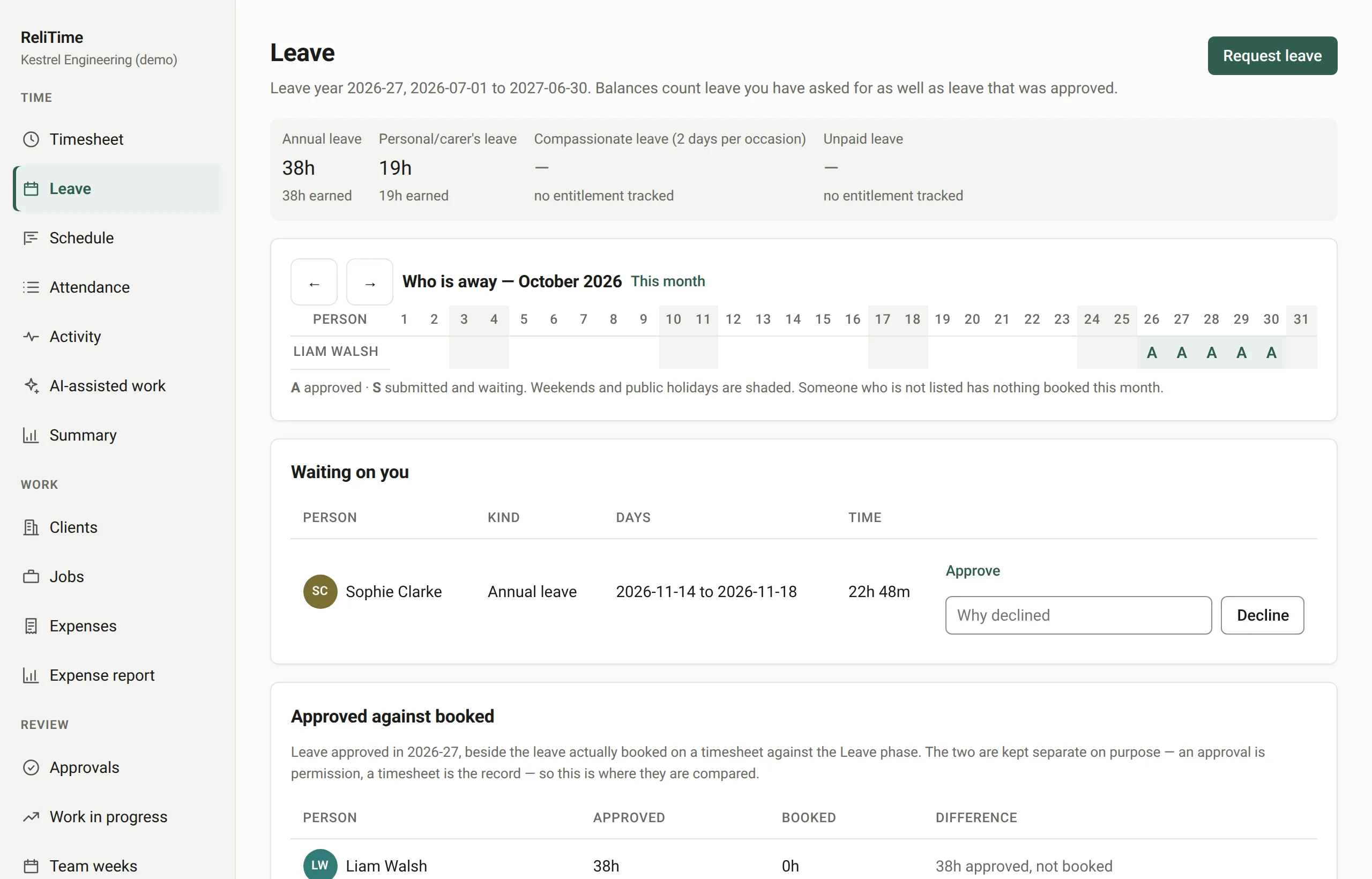
A new Australian organisation starts with the National Employment Standards leave types: annual leave of four weeks and personal/carer’s leave of ten days, both accruing and neither for casual staff, compassionate leave and unpaid leave. Each is a setting you can change. The leave year starts in July.

The leave screen: balances by leave type and a month timeline showing who is away on which days.

Fill the week in from site

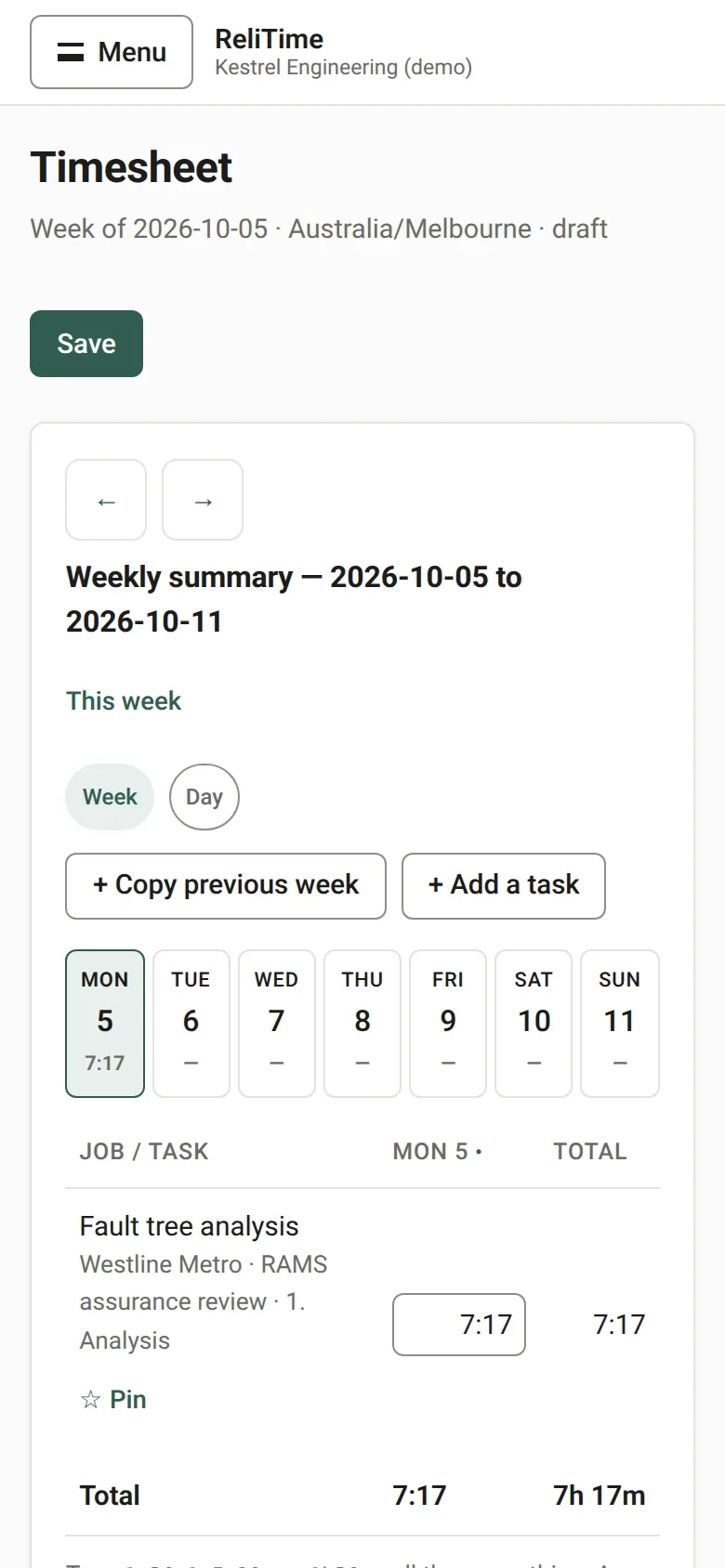
On a phone, the week shows one day at a time, with buttons large enough to use in one hand. Nothing is saved until Save is pressed, so a figure typed and corrected on the way never becomes two entries on the record.

The weekly timesheet on a phone, showing a single day with its tasks and hours.

From the client to the invoice, in one place

Each step feeds the next, so the invoice is built from the same hours that were approved. You never retype them into something else.

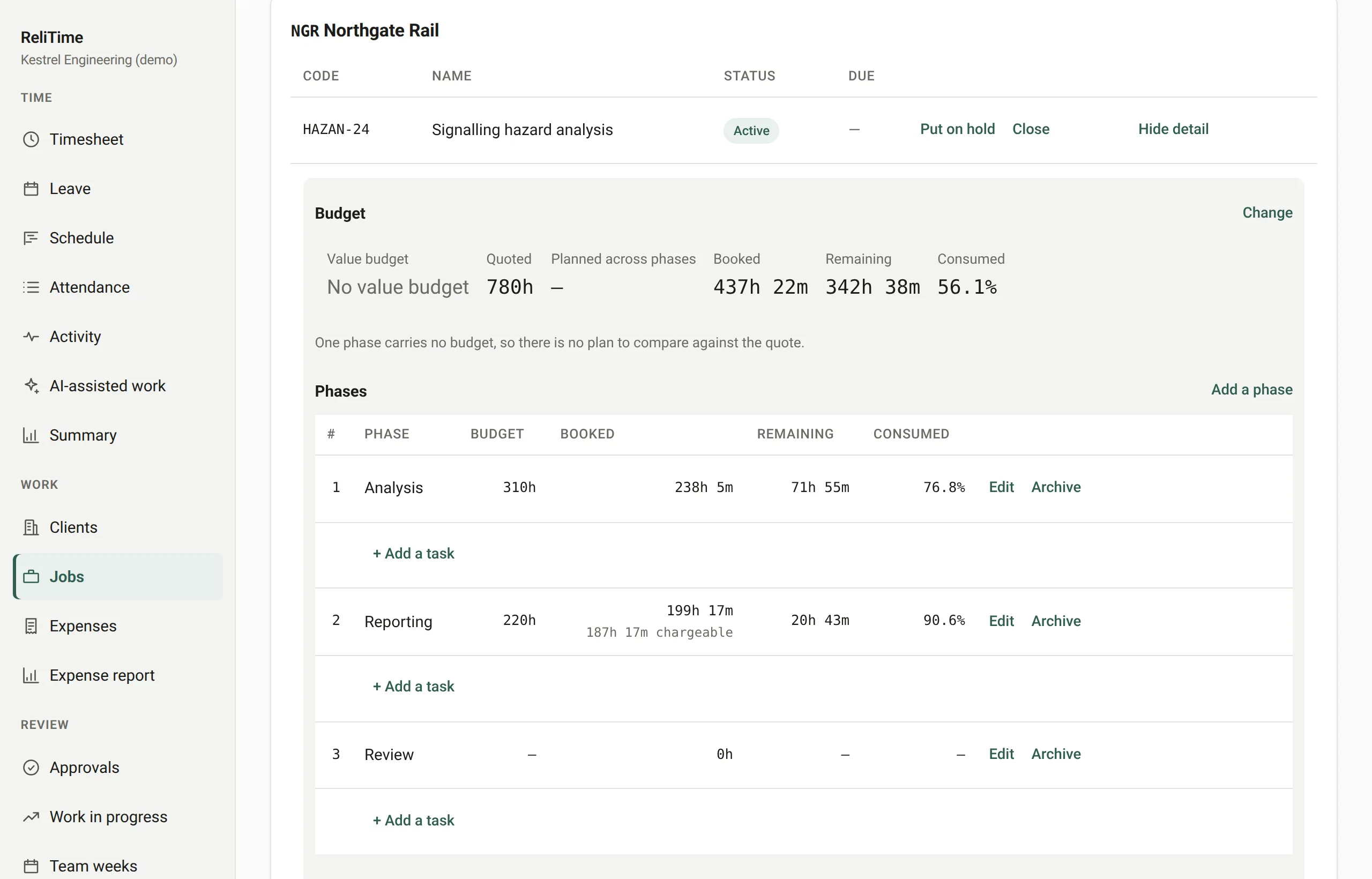
  1. A job's budget panel: hours quoted, booked and remaining, the share consumed, and one phase listed as past its budget.

    Step 1 of 7 · Priya, administrator

    Priya sets up the job

    A client, a job with phases and tasks, a quote in hours, and the engineers assigned to it.

    Next: Liam fills in his week

  2. Liam's weekly timesheet: tasks for several client jobs down the side and his hours for each day of the week.

    Step 2 of 7 · Liam, engineer

    Liam fills in his week

    Hours typed into the week, saved when they are right, submitted when the week is done.

    Previous: Priya sets up the jobNext: Emily approves it

  3. The approvals queue: expense claims and submitted weeks, each waiting for a decision.

    Step 3 of 7 · Emily, approver

    Emily approves it

    The week is approved and locked, and from then on nothing in it can change.

    Previous: Liam fills in his weekNext: The hours are priced

  4. The work in progress report: hours worked, their value, what is still to bill, and utilisation by person.

    Step 4 of 7 · Emily, approver

    The hours are priced

    Every hour at the rate in force on the day, and what is still to bill.

    Previous: Emily approves itNext: Priya sees what is ready to bill

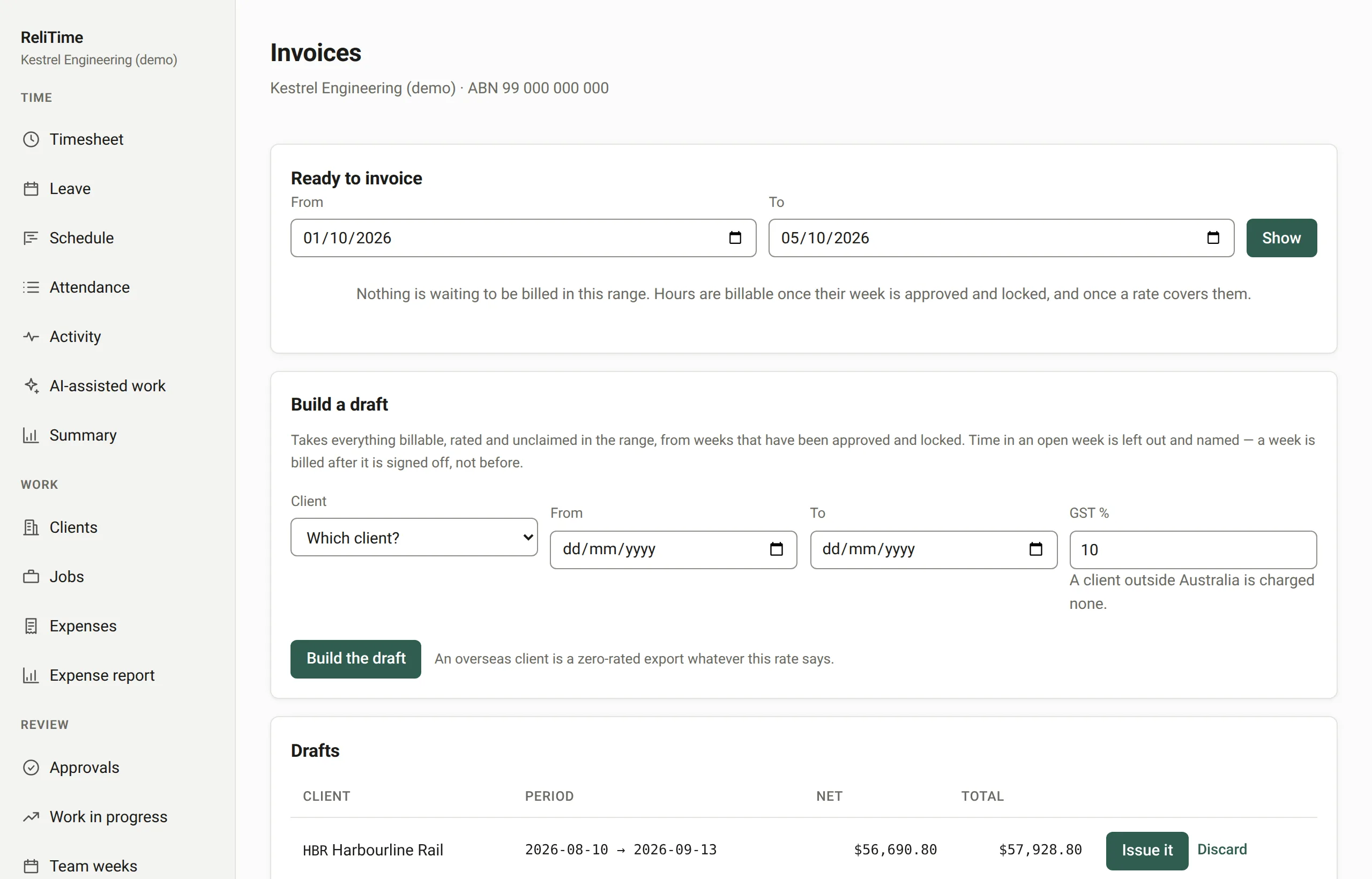
  5. The ready to invoice panel: each client with the hours worked, the billable hours and the value, beside a button to create a draft.

    Step 5 of 7 · Priya, administrator

    Priya sees what is ready to bill

    Every client with approved, locked work waiting, and what the invoice would come to.

    Previous: The hours are pricedNext: She raises a tax invoice

  6. A tax invoice on screen, with the supplier and recipient ABNs, the taxable value of each line, and the GST worked out below.

    Step 6 of 7 · Priya, administrator

    She raises a tax invoice

    GST at 10%, or GST-free for an overseas client, numbered in the series, and emailed as a PDF.

    Previous: Priya sees what is ready to billNext: The payment comes in

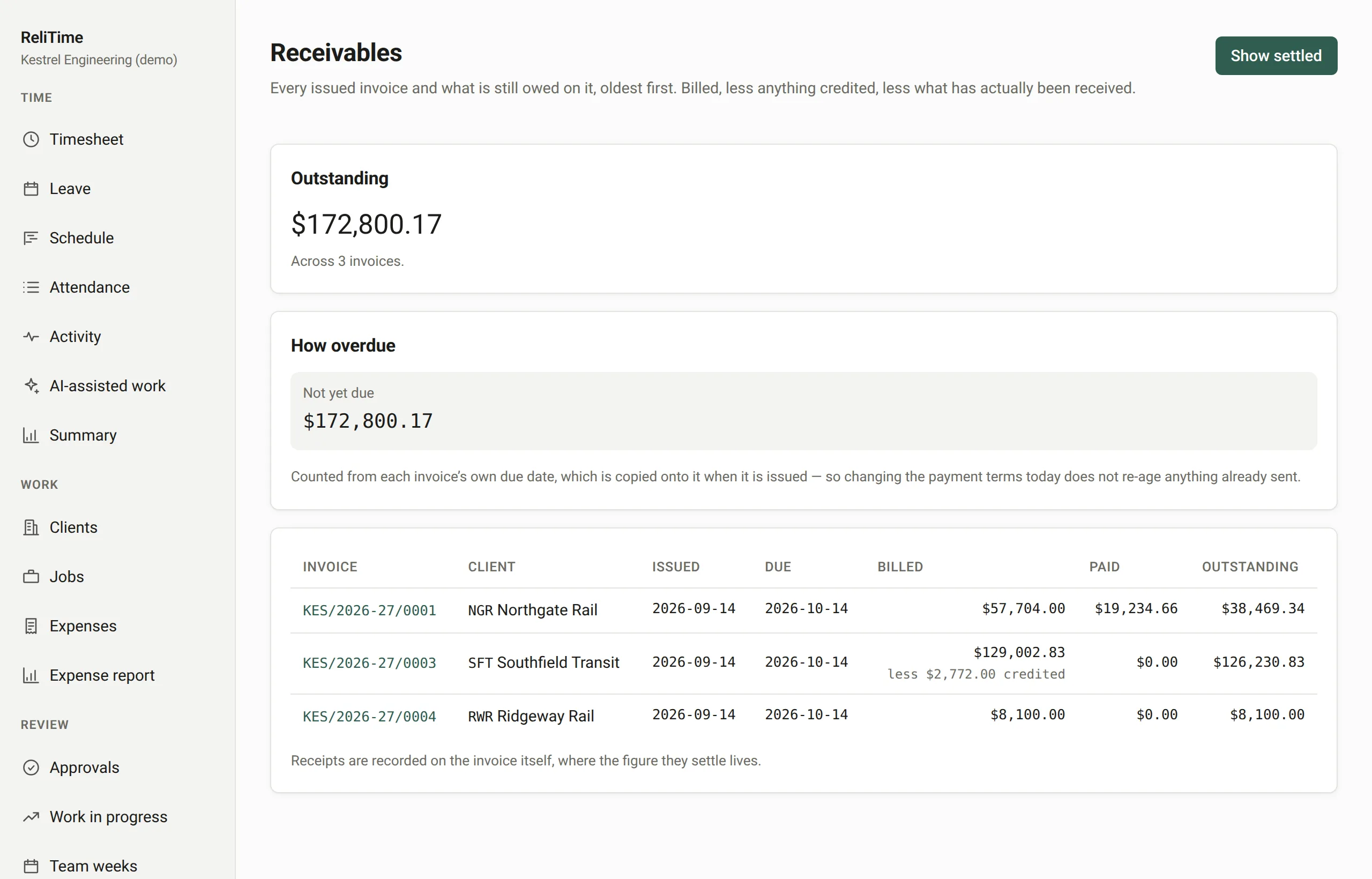
  7. The receivables ledger: the total outstanding, how overdue it is, and each invoice with what was billed, paid and is still owed.

    Step 7 of 7 · Priya, administrator

    The payment comes in

    Recorded against the invoice, with the ledger showing what is still owed.

    Previous: She raises a tax invoice

Follow one week, step by step

Free tools for Australian businesses

ABN checker

Check that an ABN is well formed before it goes on an invoice. Free, with no sign-up.

Open the ABN checker

A free timesheet template

A weekly Excel timesheet by project and phase, with the totals worked out for you. Free to download, with no sign-up.

Get the template

Security and your data

Hosted in Singapore

The application's servers and its database both run in Singapore.

A second factor for administrators

Owners and administrators sign in with an authenticator app as well as a password.

Your organisation, kept apart

Each organisation's data is separated where it is read, not by a filter somebody has to remember to add.

Records that stay

Time entries and approvals cannot be deleted, even by the application itself: the database refuses the request.

More on security and your data

See it on your own kind of work

We set ReliTime up with a walkthrough rather than a sign-up form. We will take you through a working organisation, from a week of timesheets through approvals and work in progress to a tax invoice, answer your questions as we go, and set up yours.

Or write to hello@relitime.com.